Focus your audience's attention. Since 2010
Floating Watermark
Protect Your Screen Content from Unauthorized Recording and Photography
What is Floating Watermark?
Floating Watermark is a lightweight, FREE screen watermarking tool designed to safeguard your live streams or video content. It overlays semi-transparent watermark on your screen that float slowly, effectively preventing unauthorized recording or photo theft. Whether you're a content creator, educator, or business user, Floating Watermark helps you protect your intellectual property and ensures your audience can always identify the original source and creator. Floating Watermark is an essential aid for asserting ownership.
This free tool is offered as a companion to our product : PointerFocus . For a more sophisticated and efficient presentation toolkit, we invite you to visit the homepage of our main product: PointerFocus.
Version: 1.0
Size: 14KB
Supported System: Windows 11/10
Key Features:
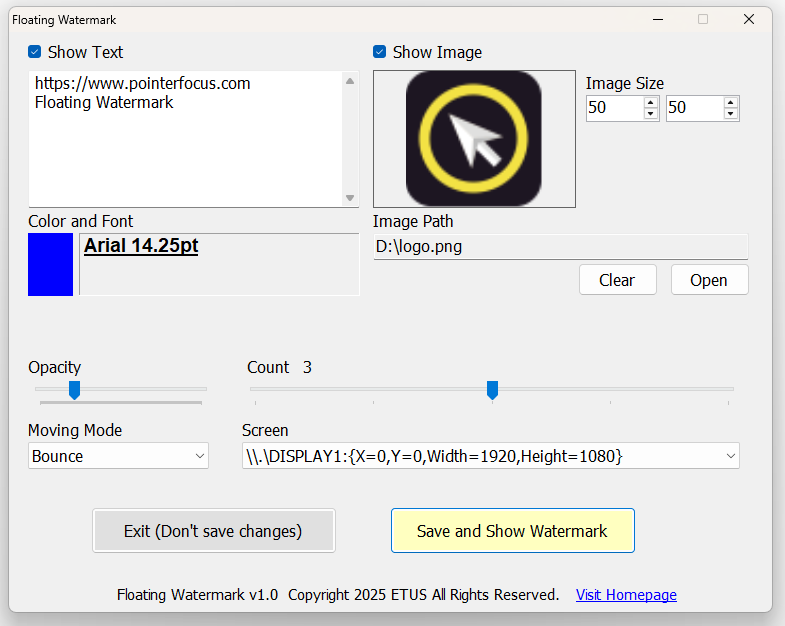
- High Customizability: Users can customize watermark text, fonts, colors, and even use their own images as watermarks to meet personalized needs.
- Dynamic Floating Effects: Watermarks move slowly across the screen in various modes (e.g., Bounce, Wander, Teleport), enhancing anti-piracy effectiveness.
- Multi-Monitor Support: Seamlessly works with multi-display setups, making it ideal for professional streamers and video producers.
- Transparency Adjustment: Adjust the opacity of watermarks to ensure they are visible without interfering with main content.
- Lightweight and Non-Intrusive: The software runs with low resource usage, and watermarks overlay the screen without affecting normal operations or system performance.
- Portable Mode: Offers a portable version that can be run from a USB drive or other removable storage, allowing you to use it on any PC without installation.
- Completely Free: Enjoy professional-level watermark protection without any cost.
Basic Usage Instructions:
- 1. Download and Install: Freely download Floating Watermark from the official website and complete a quick installation by just unzipping and copying. Offers a portable version that can be run from a USB drive or other removable storage.
- 2. Set Watermark Content: Open the software, enter text or select an image for the watermark, and adjust fonts, colors, and size.
- 3. Customize Floating Modes: Choose how watermarks move (e.g., Bounce, Wander, Teleport) and set transparency and quantity.
- 4. Apply and Preview: Click the "Save and Show Watermark" button to display watermarks immediately on the screen; you can adjust them anytime as needed. After adjust just click "Save and Show Watermark" to apply the new watermark settings.
- 5. Exit: Click "Exit (Don't save changes)" button or the close button to exit the application without saving new changes. The program will retain the settings from the last time you clicked "Save and Show Watermark". These settings will be automatically loaded the next time the program starts.

Who needs Floating Watermark?
- Content Creators: Live streamers, video producers, and social media influencers looking to prevent content theft.
- Education and Training Sector: Teachers and online course providers protecting educational materials from unauthorized distribution.
- Business Users: Ideal for internal meetings, presentations, or displaying sensitive data to ensure business confidentiality.
- General Users: Anyone wanting to protect screen privacy, such as when sharing screens in public settings.
You are free to use Floating Watermark in any personal, commercial, or non-commercial context.
If you have feedback or suggestions, please feel free to contact us.
Download Floating Watermark now and add an intelligent layer of protection to your digital content!