Focus your audience's attention. Since 2010
Mouse Toolbox for Presenters and Trainers
What's PointerFocus?
PointerFocus is a handy Windows application designed for presenters, trainers and teachers who want to highlight their mouse pointer. The application offers some easy-to-use functions such as highlight cursor, mouse spotlight, keystroke visualization, magnifier and on-screen annotation.
With the help of PointerFocus you can keep your audience focus on the area of interest and make your demonstration more understandable.
PointerFocus Demo Video
PointerFocus Features:
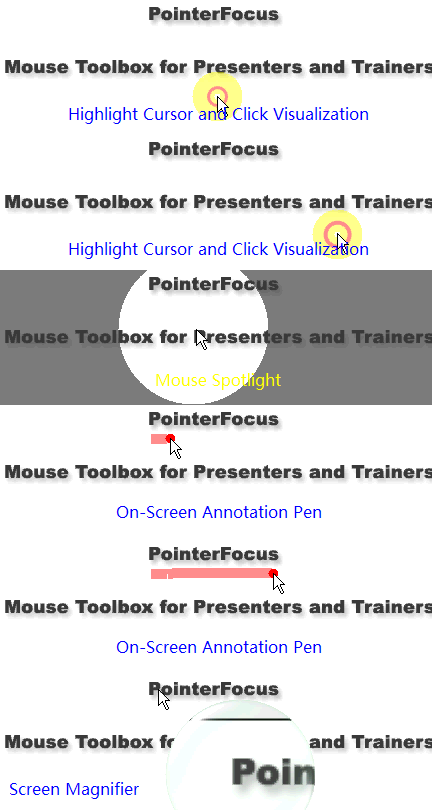
 Highlight mouse pointer with a colored circle, and when you click the mouse button the ring animation can show your mouse click actions to your audience. Highlight mouse pointer with a colored circle, and when you click the mouse button the ring animation can show your mouse click actions to your audience.
|
 |
 Keystroke visualization can show your audience which shortcuts you have just pressed. This feature can help you make your demonstration more understandable. Keystroke visualization can show your audience which shortcuts you have just pressed. This feature can help you make your demonstration more understandable.
|
 |
 Mouse Spotlight - when you choose this tool, it will dim the screen and put a "spotlight" around your mouse pointer. This can focus your audience's attention to the area of interest. Mouse Spotlight - when you choose this tool, it will dim the screen and put a "spotlight" around your mouse pointer. This can focus your audience's attention to the area of interest.
|
 |
 On-Screen Annotation Pen - when you choose this tool, you can use your mouse pointer annotate any part of the screen with customized color and pen width. On-Screen Annotation Pen - when you choose this tool, you can use your mouse pointer annotate any part of the screen with customized color and pen width.
|
 |
 Screen Magnifier - when you choose this tool, you can show your audience details of any part on the screen. Screen Magnifier - when you choose this tool, you can show your audience details of any part on the screen.
|
 |
 Android Remote Control - You can use Android App to remote control mouse actions and PointerFocus functions. Android Remote Control - You can use Android App to remote control mouse actions and PointerFocus functions.
|
 |
Who needs PointerFocus?
- Teachers
- Presenters
- Demo Makers
- Trainers
What's new in version 2.4
- Added: Select pen color from right click menu
- Added: Select pen size from right click menu
- Improved: Spotlight performance
- Fixed: some small bugs
What's new in version 2.3
- Improved: Spotlight performance
- Fixed: some small bugs
What's new in version 2.2
- Added: New Option for Hiding highlight circle
- Added: New software icon
- Improved: Smooth drawing of UI
- Fixed: some small bugs
What's new in version 2.1
- Added: New Option for Showing Mouse Click Action Text
- Added: New Option for Showing all Keystrokes
- Added: New Option for highlight cursor
- Fixed: some small bugs
What's new in version 2.0
- Added: New Toolbar UI
- Added: Optimize performance for Windows 10
- Fixed: some small bugs
What's new in version 1.9
- Added: Supports more drawing tools in Pen mode
- Added: Option to hide hint text in Pen mode
- Fixed: some small bugs
What's new in version 1.8
- Added: Supports Mouse Gestures to toggle spotlight, pen and magnifier functions
- Added: Supports presentation pointer mode when using Pen function
- Fixed: some small bugs
What's new in version 1.7
- Fixed: Options Dialog font size under 120 DPI
- Fixed: Magnifier and spotlight covered by menu
- Added: Supports Dual Screen(Dual Monitors)
What's new in version 1.6
- Fixed: "Double Accent Mark" bug when inputting Spanish.
- Fixed: magnifier center bug on some high resolution screen.
- Optimized "Magnifier" Function. Magnifier can reposition when out of screen boundary.
What's new in version 1.5
- Optimized "Keystroke visualization" Function. Prevent repeatedly showing same keystrokes
- Tested on Windows 8.1 system. Ready for Windows 8.1
What's new in version 1.4
- Supports Android App to Remote Control Mouse Actions and PointerFocus Functions
What's new in version 1.3
- Supports hotkeys to switch Highlight Cursor and Keystroke Visualization.
- Supports minimizing Toolbar to System Tray Icon
- Add option to disable the glass effect in Magnifier
- Supports Tray Icon Menu to switch tools
- Toolbar can remember the last position.
What's new in version 1.2
- Supports hotkeys to switch Mouse Spotlight, Pen and Magnifier.
- Supports minimizing Toolbar to Windows Task Bar